

Vendor lock-in is hostile to the Fediverse
I’ve just had to part ways with my previous Mastodon server for ethical reasons, so I thought I’d take the chance to write up why and also how.
One of the defining features of legacy social media platforms is the reliance on inertia to keep users trapped. All your friends are on Facebook, so you don’t want to leave because you’ll lose touch with them. You’re used to the way the Instagram app works and you don’t want to learn your way around a new one. Yes, Twitter/X is a cesspit full of the sort of things you’ve specifically created laws against, but you have a lot of followers and no spine so you’re still there when other governments are banning it entirely because of all the CSAM and deepfake porn. Legacy social media weaponises your fear of change and the mental bandwidth needed to get used to something new.
Federated social media like Mastodon is different. The server your account lives on can communicate with any other server that runs the ActivityPub protocol, you can interact with it using any compatible app and at any time you can pack up and move to a different server without losing your connections and having to start over from scratch. You can use the same app you used to use on mastodon.social to connect to beige.party or jorts.horse.
The Mastodon instance I used to be on recently announced that it’s getting its own mobile app:
Connecting to Tŵt on your phone has always been a bit of a bother, especially when it comes to plugging in our domain instead of the default or suggested services. These apps work great, but they aren’t built for the average everyday person. They’re all a bit techy, and they don’t reflect our community the way we want to be presented. So, we’re building our own app.
I should stop here to say that I don’t believe plugging in a server’s address once when you first set up an app is “a bit of a bother” or “a bit techy”. The “don’t worry your pretty little button head about it” tone is incredibly patronising and an insult to your intelligence, but what I believe is not the important part.
If that’s what Tŵt Cymru believes, then releasing an app that’s locked to their instance is a cynical attempt to make it more difficult for less technical users to migrate away from their server, because leaving means they’d have to find, install and get used to a whole new app. The exact same shady tactic that legacy social media sites use to keep people locked into their service.
We envision a future where many other communities have their own branded, custom apps just like this one, apps that tie directly to their server and remove the hurdles that keep people apart.
Once of the greatest strengths of the Fediverse is the decoupling of the server from the app you use to connect to it. Interfering with that decoupling is a disservice to you, the user, in service of a site operator who wants to parasitically benefit from federation while making it more difficult for users to leave.
So what do you do if your instance’s admin joins the Dark Side?
In the spirit of “educate, don’t patronise”, here’s the process I went through to migrate from toot.wales to beige.party.
The first thing to do is to visit https://yourinstance.com/settings/export in a web browser, and download all your data. You should probably do that periodically whether you think your instance admins are up to shenanigans or not. Instances can offline without warning, and it’s best to be prepared.
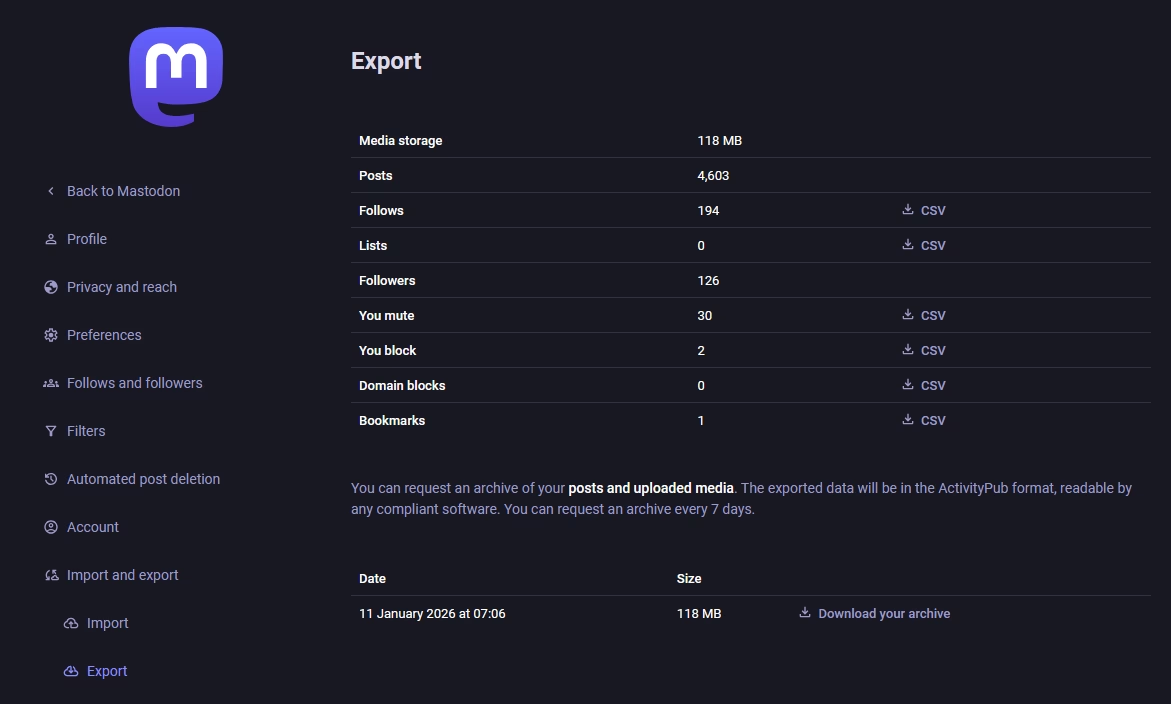
The posts archive isn’t very useful yet, as there’s currently no way to migrate the content you’ve created to a new instance. The important bit for migration is the CSV files in the right column.
Once you’ve found a new instance to move to, you first need to create an alias by entering your old account in the account settings of your new account.
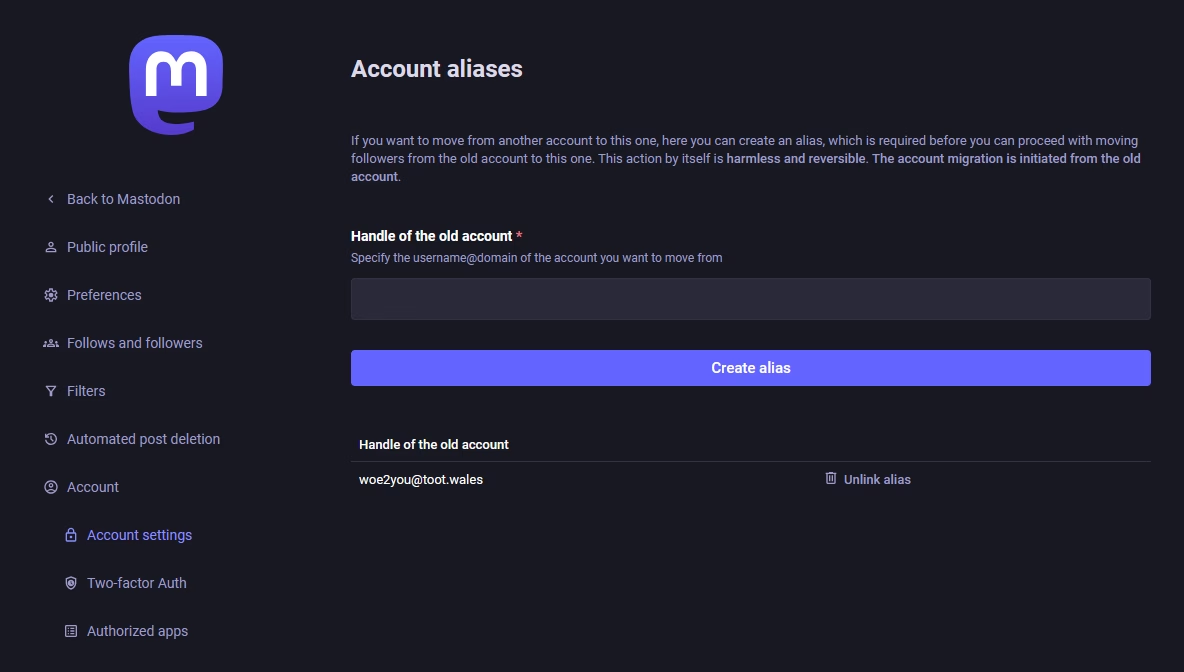
Once you’ve done that, log into your old account and confirm the move from that end by entering your new account’s handle. You’ll need to enter your password to confirm it, because once you hit the “Move followers” button your followers will be permanently moved to the new account.
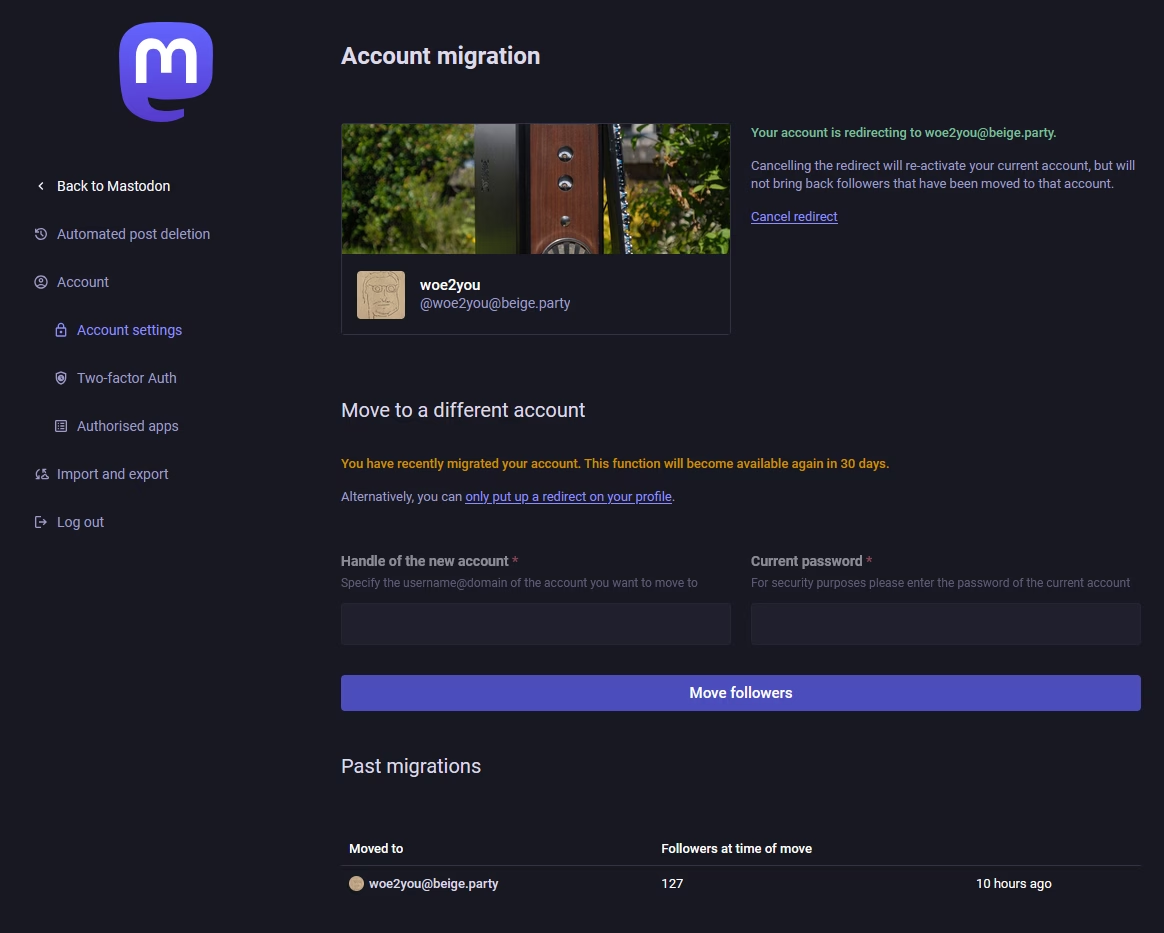
A bit of manual tidying up
Unfortunately moving your followers is as far as the automatic migration process goes, but you can use the CSV files you downloaded from your old server in the first step to manually import the people you’re following, your lists, mutes, blocks, and bookmarks. Ideally this would all be automatic too, but this flow doesn’t seem to be much of a priority for Mastodon. I’m going to make the charitable assumption here and say they’re prioritising features that people will use every day over ones that people should hopefully have to use rarely if at all, but this is one of those things that’s quite important despite how infrequently it’s going to be used so I think it would benefit from a little more love.
You’ll also have to fill in your profile details again, because those don’t migrate either.
Leave a Reply